If you're in this article because you're looking to cancel your plan, we're already sorry to see you go!
However, the process is done by the user themselves inside the platform. Just access your plan settings by clicking on "Manage Plan".
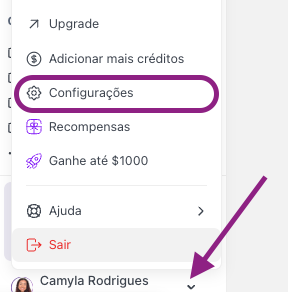
To get to this screen, you click on your user icon in the lower left corner, then on settings and Subscription:
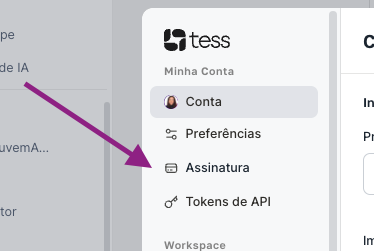
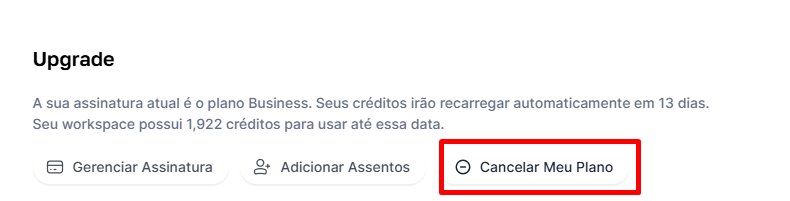
You’ll see an overview of your current plan and you can click on the option cancel my plan, see the screenshot example below:
Then, Tess itself will notify you asking if you really want to cancel, like in the example below:
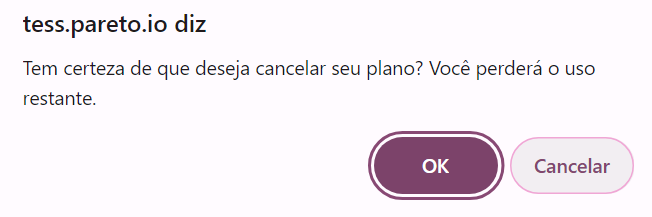
By clicking OK, that’s it! Your plan will be canceled or scheduled for cancellation.
If you’re within the first 7 days of your first subscription, the process is the same, it will indicate the refund. But after those 7 days, the system will schedule the cancellation of the plan’s renewal, keeping your plan active until the end of the current cycle.
In other words, if you have a monthly plan and it was renewed 5 days ago, you still have 25 more days on the platform; the cancellation will happen at the end of that period, and it won’t renew for the following month.
Also, if your plan is yearly and you’re in month 7 of 12, you’ll still have 5 months of access to Tess. The cancellation will mean the plan won’t renew at the end of the current cycle, and after those 5 months your account will be canceled.
If you have any questions or need anything else, you can contact our support at: suporte@tess.im.
We look forward to hearing back from you and hope we can help you in the future!
