Use a single Tess AI subscription to work with as many people as you want in the same workspace, sharing credits in a single wallet.
What is it?
The Shared Account lets you keep a single annual subscription and invite friends, family, or colleagues to your workspace, with no extra cost per user. Everyone uses the same credit wallet. Instead of paying for seats, you only pay for the AI credits the team actually consumes.
Why is it important?
No charge per user: you don’t pay “per head,” just for the credits used. That makes it easy to bring your whole team, friends, or family to try out Tess.
With the annual plan, you get predictability: the annual fee is fixed and AI usage is charged per credit.
In other words, Tess works like an AI club: annual or monthly membership + credit-based usage at the world’s biggest AI marketplace (over 200 models) + zero mandatory per-user charge.
Step-by-step to share your account with a new member
Check out the demo with the step-by-step at the link below:
Go to settings
Log into Tess AI.
Click on your user
Go to Settings.
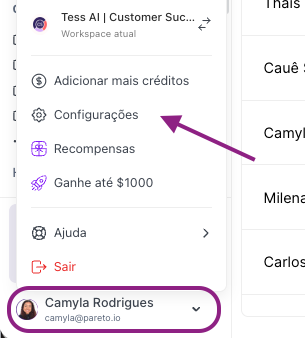
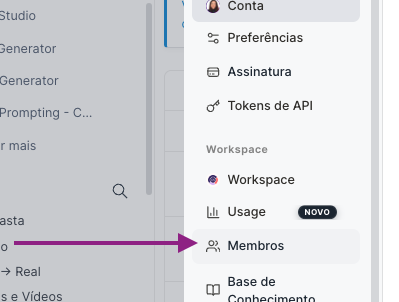
Open the members area
Click on “Members”.
Add a new member
Click on “Add new member.”
Type the email of the person you want to invite.
Send the invite.
Confirmation
The invitee will get an email with the access link.
Once they accept, they'll use the same account/workspace and the same credit wallet.
How billing works
You're charged based on your plan and the tier of credits you picked, and you can change the tier or buy credit bundles any time you need.
These credits go into a single Wallet, shared by everyone who’s in the workspace.
Every time you generate something with AI, a small amount of credits is deducted, depending on the model used. Tess also offers unlimited models, which don’t use credits from this wallet. Just make sure to check whether it’s an unlimited model or not.
For legacy plans (Beginner, Individual, and Business) this scenario is a bit different. There are Lite and normal options to avoid charges, and a default option that are paid seats.
Good practices
Agree with the group on how the credits will be used (e.g.: tests, studying, work, personal projects).
If you’re responsible for the account, keep checking the Wallet from time to time to understand how fast credits are being used.
Use the Shared Account to encourage people around you to learn AI with you, with just a tiny extra investment.
At Tess, we believe AI is for everyone.
That’s why, with Shared Account, you can bring those around you into the same account, learn together, and get the most out of Tess AI without paying per user.
