Right now, we offer the Basic, Pro, Teams, and Enterprise plans. Each plan offers a set of features and a volume of credits suited to different usage profiles.
At Tess AI, transparency is key. Unlike other platforms, you’ll always know exactly how many credits you have and how much each AI model uses.
For every action you perform on the platform (and each model you select), the credit usage (or its proxy) is clearly shown. In chat, you’ll see how many credits are consumed per 100 input tokens (what you send to the AI) and per 100 output tokens (the AI’s response). For images and videos, you’ll be informed, for example, of the generation cost of each asset. This lets you manage your credits carefully, choosing the most suitable model for each task.
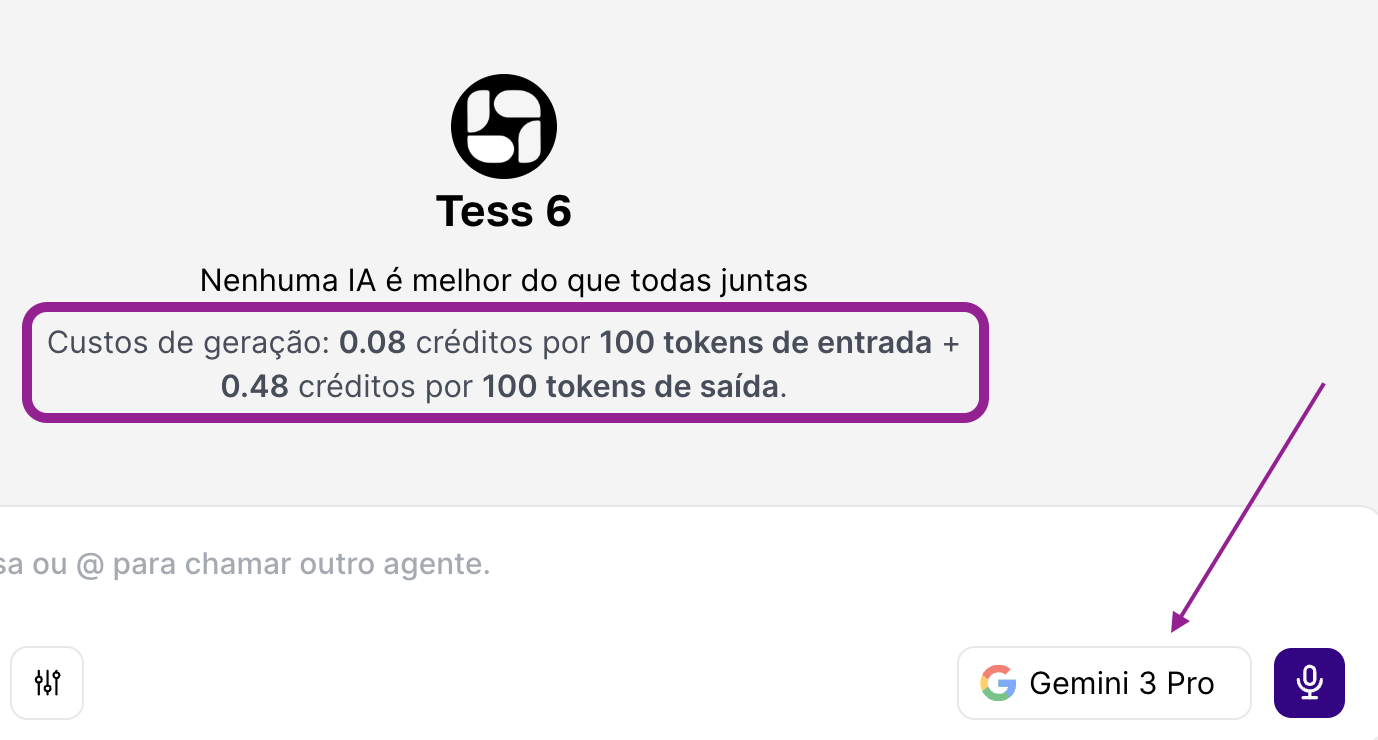
• Careful Management: Just like you manage your personal finances, it’s important to manage your credits on the platform. AI models for images and videos, for example, tend to use more credits than text models. By selecting the right model for the job, you optimize your usage and make sure your credits last longer.
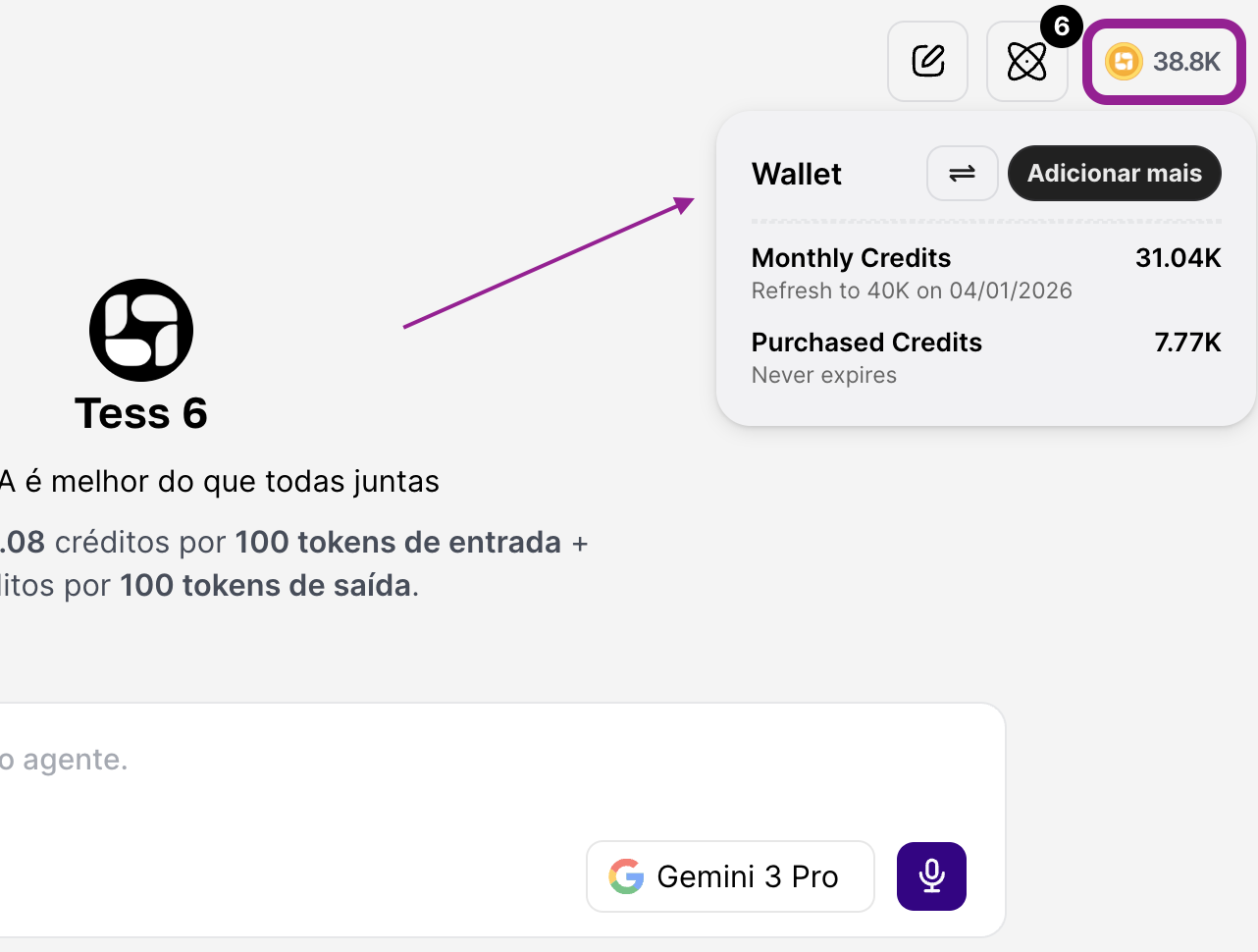
All users can track their credit balance in the AI Wallet in real time by clicking the yellow coin icon in the upper right corner of the chat.
No. In every plan, we charge based on usage. We use a shared wallet system, allowing you to add unlimited members to the Workspace. So billing is based on usage, managed through the credit system in Tess!
In other words, you can invite unlimited users at no extra cost: family, coworkers, classmates, and so on. Each person gets their own private account with individual usage tracking, but everyone uses a shared pool of Workspace credits.
This is the ideal model for teams or study groups to collaborate on projects, as well as for family use (“family account”), keeping in mind that Tess offers a Parental Control feature so parents can monitor how young people use the AI.
Yes. You can add or remove members from your workspace at any time in the Members area.
In the Enterprise plan, you also get Single Sign-On (SSO), which offers more security for all employees.
Payment is made by credit card, with the possibility of splitting the annual amount into up to 12 installments with no interest. And, for annual plans, we also offer the option to pay via PIX.
For the Enterprise plan, the company can also choose other payment options, such as boleto, PIX, and bank deposit.
Keeping control of your subscription is simple and intuitive in Tess AI.
You can upgrade your plan at any time. Just go to your account settings area and click on "Gerenciar Plano". There, you can choose the plan that best fits your needs and the upgrade will be applied immediately for all members of your account. In this case, the charge will be pro rata, calculated proportionally considering the end of the current cycle, whether the plan is monthly or annual.
As the owner of your company's workspace, you have full visibility over credit consumption and platform usage. You can export the data to individually analyze who is consuming more or less, as well as monitor Tess's execution history, including conversations, image generations, or videos. To do this, go to settings and then the Usage tab.
We understand that needs can change. That's why the process to cancel your subscription is simple and straightforward.
To cancel your subscription, go to the "Manage Plan" area in your account settings and click the "Cancel My Plan" button. You'll be asked a quick question about the reason for canceling to help us improve.
When you cancel, your access to the platform will continue until the end of the current billing period. For example, if you signed up for an annual plan and cancel in the second month, you will still have full access to the tool until the end of the twelfth month. And if you signed up for the monthly plan, it will also stay active for the remaining days of the contracted month.
Yes, Tess AI offers a 7-day satisfaction guarantee for new users. During this period, you can test the platform and explore the available features. If you're not satisfied, you can request a full refund automatically within the 7-day period.
For any other questions related to your subscription that haven't been addressed here, our support team is available. Send an email to support@tess.im.
