Let Tess automatically choose the best AI model for each conversation, without you needing to be an expert in LLMs.
What is it?
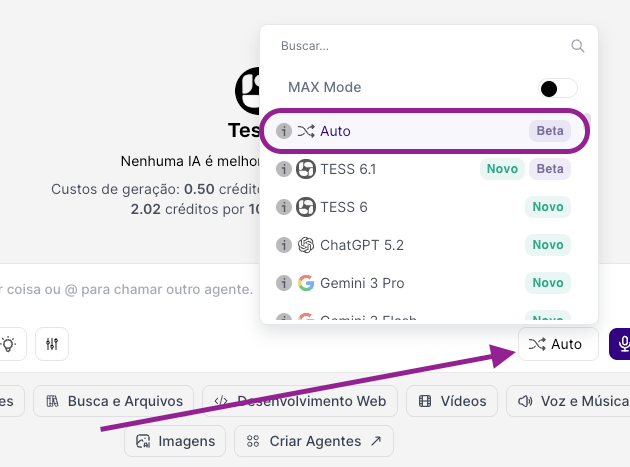
Auto Mode lets Tess choose on its own which LLM to use to answer your query. Instead of manually picking the model for each chat, Tess evaluates the type of message and selects the most suitable model at that moment.
This works through a sophisticated routing algorithm developed by Tess to pick the best model according to several variables: answer quality (performance), speed, cost, and the complexity of the model and request. This is the safest option for anyone who wants good answers without needing to understand models.
Why is it important?
Ideal for non‑experts: you don’t need to know AI technical details.
Good overall performance: Tess chooses a suitable model for most cases.
Collaboration between models: with each query, a new model can be called and collaborate with the previous model’s answer.
Quick start
Open the Chat screen in the desired workspace.
In the LLMs control, turn on the Auto button.
Send a few typical messages from your usage (support, sales, internal).
Watch the quality and response time.
If in any specific case you want to test another model, temporarily turn off Auto, select the LLM manually, and compare.
Best practices
Use Auto as the default for teams that aren’t familiar with AI.
Choose a specific LLM when there’s a clear reason, leaving Auto Mode due to a quality, cost, or compliance requirement, for example.
Test periodically: compare answers with Auto on and with a specific AI model to make sure the balance still makes sense for your context.
