
Put your Tess agent directly inside websites and apps, as a chat widget or embedded component. Ideal for customer support, lead capture, onboarding and internal assistants.
What is it?
The Embedding feature lets you embed a Tess agent in:
institutional websites
customer logged-in areas
own products / SaaS
intranets and internal portals
Tess generates an embed code (usually a script or iframe) for you to paste into your site/app. From there, your users can talk to the agent directly in that interface.
Why it matters
Native experience: the user doesn’t need to leave your site to talk to the agent.
24/7 support: support agents, FAQ, and onboarding always available.
Conversion: sales agents help qualify and guide leads in real time.
Flexibility: the same agent can be used across multiple channels (website, app, internal and external).
How to generate an embedding code?
The first step is creating and testing the agent (prompt, Knowledge Base, Tools, etc.).
Adjust the visibility, because your agent can’t be private to enable the Embed.
Open Agent Studio.
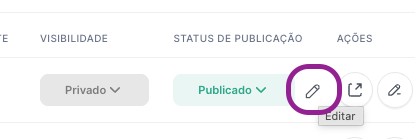
In the Agent Studio agent list, hover next to the status and click the pencil for the agent’s detailed settings.
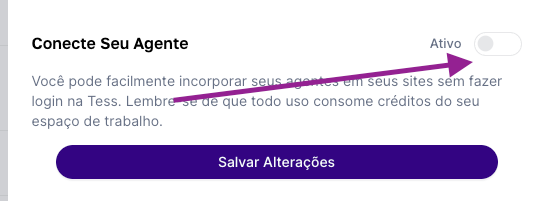
Scroll to the bottom and enable the “Connect Your Agent” option.
Choose the embed format and use the code in your website/app HTML.
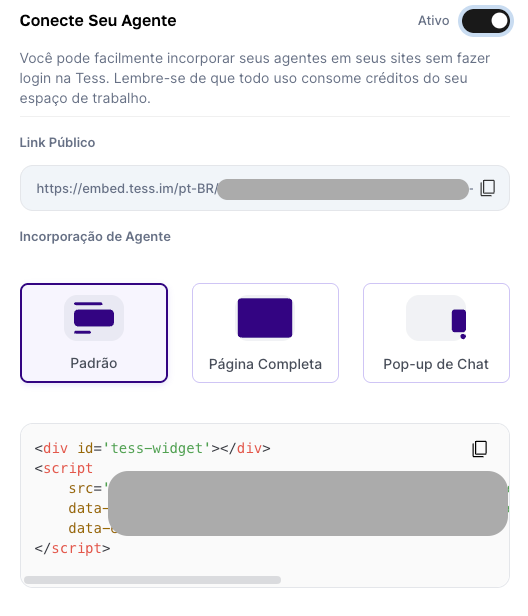
That way, the widget or chat component starts showing up for visitors, connected to your agent.
Best practices
Start by embedding in test/staging environments before going to production.
Make sure the agent is configured and tested for external use.
Check if your company’s privacy and LGPD policies cover interactions with AI agents.
