With Tess AI’s Audio Generator, you can turn any text into a smooth and natural narration, using a wide range of voices and languages.
What is the Audio Generator?
The Audio Generator is an Artificial Intelligence tool that synthesizes the human voice from written text. Integrated with Agent Studio, it lets you generate high-quality audio files without needing microphones, recording studios, or professional voice actors.
With an intuitive interface, you can choose between different voice profiles, adjust the pitch, speed, and narration style so it perfectly matches the message you want to convey.
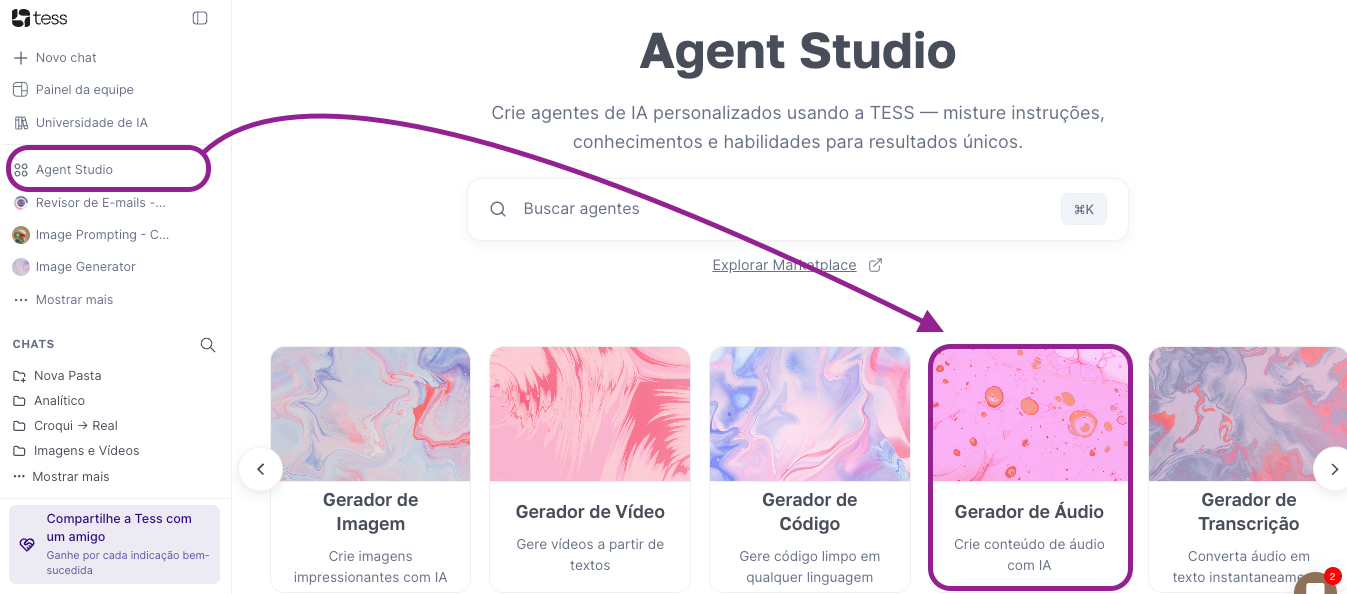
How to Use the Audio Generator?
Creating a narration is a quick process. Just follow the steps below:
In the platform's main menu, go to Agent Studio.
Inside Agent Studio, click on Audio Generator
Explore the configuration options in the menu to select the voice, language, and style you prefer.
After adjusting the settings, in the text field, type or paste the content you want to narrate.
Click the button to generate the audio. You’ll be able to listen and, if you’re satisfied, download the file.
See more below:
Practical Applications for Your Business
The Audio Generator is a versatile tool that can be used in different contexts. Here are some examples:
Videos for Social Media and YouTube: Create narrations for your institutional, tutorial, or marketing videos.
Training Materials (E-learning): Develop more accessible and dynamic courses and educational materials.
Podcasts and Audio Content: Produce your own podcasts or turn blog articles into audio versions.
Customer Service: Generate standardized audio messages for IVR (Interactive Voice Response) systems.
Tips for Quality Narration
To make sure the result sounds natural and professional, keep the following tips in mind:
Review the Text: Typos or grammar mistakes may be interpreted literally by the AI. Always review the text before generating the audio.
Use Punctuation: Commas, periods, and other punctuation marks help the AI create the right pauses and intonation, making the narration sound more human.
Test Different Voices: Each voice has a unique style. Try different profiles to find the one that best matches your brand and your audience.
Explore the power of the Audio Generator and discover how Tess AI can help you create audio content in an innovative way and with professional quality.
Remember that you can also create audio and voice-overs in Tess AI Chat by enabling the tools related to those features. This can be useful when you’re already in a conversation and want to continue with the same project inside the chat.
