This function lets you extract text from specific pages of a PDF document. It’s useful to focus on particular sections of a document without needing to process the entire file, saving time and resources.
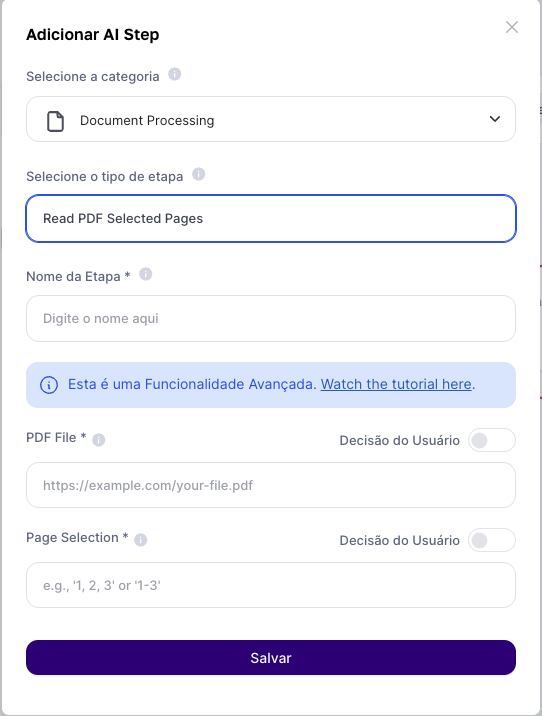
Fill-in Fields:
Insert the file or PDF link: Provide a link to a publicly accessible PDF file. Alternatively, you can use the result from the user input "Subir Arquivo" to extract data from files stored on your computer.
Specify the Pages: Indicate which pages of the PDF you want to extract the text from. You can enter a single page number, a range, or a comma-separated list.
Output Result:
The text from the specified pages will be extracted.
Use Cases:
1. Analysis of Specific Chapters: Perfect for students and researchers who need to analyze specific chapters of academic books.
2. Review of Legal Documents: Lets lawyers quickly review specific clauses in lengthy contracts.
3. Compilation of Sector Information: Makes it easier to collect information from certain sections of annual reports or technical documents for market analysis.
Limitations:
It’s important to keep in mind that training your AI based on PDF documents extracted through Tess AI has a size limitation.
The training can’t exceed 80,000 words. So make sure the selected PDF is within this limit. If you have a PDF with more than 80,000 words, consider splitting it into smaller parts or selecting only the most relevant sections.
Implementation Examples:
Case 1: Book Section Analysis: A user uploads a PDF of a book and specifies that only the pages from chapter 3 should be read to focus on a specific topic.
Case 2: Querying Contract Clauses: A lawyer uses a fixed link to a contract and extracts only the pages containing clauses of interest for quick review.
Conclusion:
The "Read PDF Selected Pages" function is a valuable step in Tess AI to extract text from specific pages of PDF documents, allowing a more targeted and efficient analysis of relevant information without needing to process entire documents.
