Language models have a knowledge “cutoff date”. Tess AI’s Internet Tools break this limitation by connecting the chat to the web in (almost) real time. This way, the AI can look up updated information, check reliable sources, and bring answers based on what’s happening right now.
Turning on the Internet Tool
Open the chat and click the Tools icon in the message box, turn on the internet option, and then choose which engine you want to use at that moment.
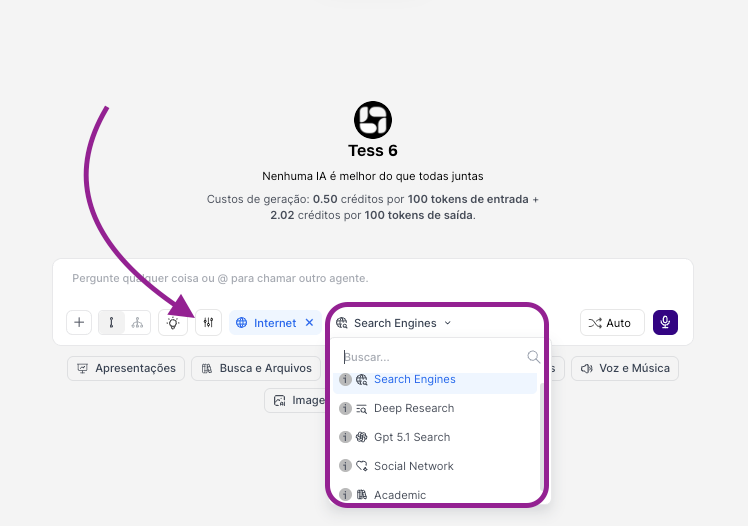
Check below what each search engine does and when to use them:
Search Engine (Mecanismo de Busca)
This is the default web search tool, similar to using Google or Bing inside Tess. It runs a direct search based on your prompt and returns information from the top results.
When to use it
Direct and factual questions
Recent news and current events
Quick queries where you want a straight-to-the-point answer
Usage examples
“What was the result of yesterday’s game between team A and team B?”
“What is today’s dollar exchange rate?”
“Make a summary of the main news of the day in Brazil.”
“What are the trends in the beachwear market for year X”
Deep Research (Pesquisa Profunda)
It’s like having a dedicated research assistant. Instead of a quick search, the AI, Deep Research, consults multiple sources, compares information, organizes and synthesizes different content, and delivers a more robust view.
When to use it
To understand complex topics in depth
When preparing reports, analyses, and strategic documents
When you want different points of view on the same topic
Usage examples
“Do a deep research on the impacts of artificial intelligence on the job market, broken down by sectors.”
“Put together a report on the main competitors of company X, focusing on products, positioning, and recent marketing strategies.”
GPT Search (Search with GPT)
It’s GPT’s own search engine, similar to a Search Engine, but it uses GPT’s capabilities. Here it also searches, consolidates, and produces a cohesive answer.
When to use it
Direct and factual questions or even subjective ones
Recent news and current events
Quick queries and objective answers
When you need synthesis + context + clear explanation
When you want to combine “sources” and analysis
Usage examples
“What is the critics’ consensus on director Y’s new movie? List the main positive and negative points.”
“Briefly explain string theory based on the most recent information available on the web.”
Social Network (Redes Sociais)
Tool that focuses search on public information from social media profiles (like X/Twitter, LinkedIn, Instagram etc.).
When to use
To search for biographical information about individuals
Publicly available social media information about companies
Usage examples
“What relevant information is there about Company X on LinkedIn”
“How many posts, followers, and what is the bio of profile X on Instagram”
Academic (Acadêmico)
It’s the academic research tool that prioritizes searching for scientific articles and peer-reviewed papers in databases like Google Scholar and similar ones.
When to use it
Academic papers, theses, scientific articles
Projects that require evidence and formal references
When you need to cite studies, statistics, or systematic reviews
Usage examples
“Find academic articles on the effects of meditation on reducing anxiety.”
“What is the most recent research on the use of graphene in batteries?”
Remember:
Be clear about the goal and explain what you want as a result:
“I want a summary of topic XYZ in 5 bullet points”
“I only want numerical data with sources”
“List the main sources used”
Combine the research with the AI’s intelligence and, after the search, ask the LLM to compare points of view, generate actionable insights, and adapt the information to your reality (e.g.: “apply this to the context of a B2B SaaS startup”).
That way, you use Tess not only as a language model, but as a real research assistant connected to the real and up-to-date world.
