Turn any chat conversation into real actions: send emails, create tasks, update spreadsheets, and trigger automation flows — all in natural language.
Integrations In Tess Chat: What Is It?
Integrations is Tess AI’s new feature that turns any conversation in the chat into a trigger for powerful automations. Now you can connect Tess AI with thousands of apps through automation platforms like Zapier, Make, and N8N.
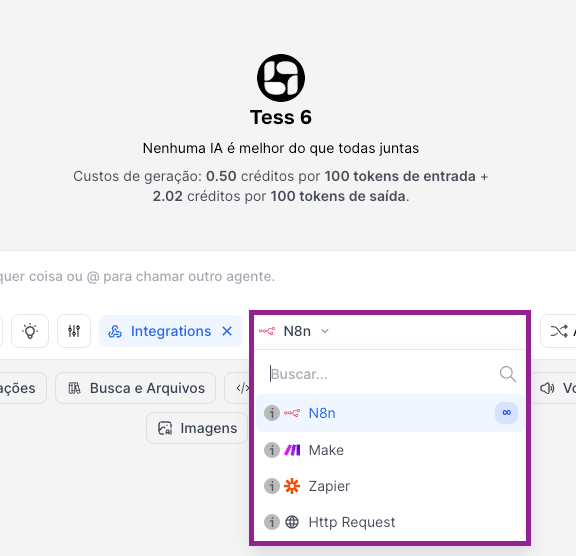
To access it, just click on Tools > Integrations and then choose the platform where you set up your automation!
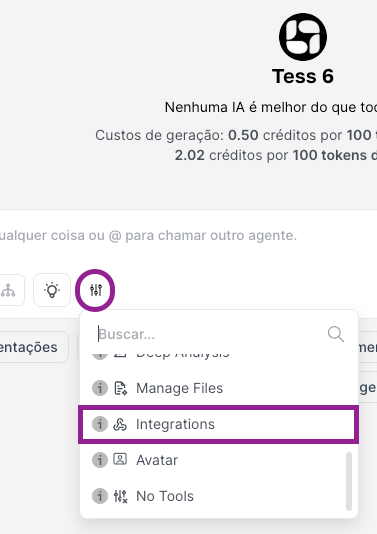
It’s important to always activate the tool before using it!
Why does this matter?
Even on the best AI platforms in the world, until now it wasn’t possible to run activities across multiple external platforms easily. The existing actions were limited, and the user had to switch between multiple tools to get a task fully done and executed.
Instead of just "talking" to the AI, you perform real tasks in external tools without leaving the chat. In other words, Tess becomes the Trigger needed to activate your automation!
Practical examples:
Send emails directly via Gmail or Outlook
Create tasks in Trello, Asana, or Notion
Update records in Salesforce, HubSpot, or Pipedrive
Notify the team on Slack, Teams, or Discord
Generate documents, update spreadsheets, process payments, and much more
Advantages:
Ease of use: Run complex automations using natural language.
Universal connection: Access tens of thousands of apps via Zapier, Make, and N8N.
Fewer errors: Tess guides the setup process from end to end.
Smart context: Tess understands the conversation and formats the data properly for each automation.
BRIEF NOTE ABOUT AUTOMATION PLATFORMS
Zapier, Make and N8N are three of the biggest automation platforms in the world!
They let you connect more than 10,000 apps and create workflows between them, with no code.
Examples of app categories:
CRMs: Salesforce, HubSpot, Pipedrive, Zoho
Email: Gmail, Outlook, Microsoft 365
Communication: Slack, Teams, Discord, Telegram
Management: Notion, Trello, Asana, Monday
Finance: Stripe, PayPal, QuickBooks
And thousands of others.
However, if the platform you want to work with doesn’t have an integration with Zapier, Make or N8N, you can integrate directly through Tess’s chat with any platform or API that accepts HTTP requests, with zero hassle!
Access and check out our API documentation at: https://docs.tess.pareto.io
USE CASES
With Integrations, you can scale several projects. In practice, your company can virtually connect with the main digital tools on the market to automate processes, such as:
For Sales:
Automatic sending of proposals
Personalized follow-ups
Meeting confirmations
For HR:
Internal announcements
Notifications about recruiting processes
Training reminders
For Management:
Periodic reports
Project updates
Communication with stakeholders
For Marketing:
Sending content
Event confirmations
Segmented newsletters
Mass posting of personalized posts for each social network
Exactly, the possibilities are endless!!

This guide below shows in practice how to set up and make the most of our Tess chat Integrations Tool:
Tess Integrations combines the power of a chat with multiple text and image AIs with the universal connectivity of platforms like Zapier, Make, and N8N. It’s a solution that’s both powerful and accessible.
If you have any questions, our team is available to help at: suporte@tessai.io.
